Build your clinic locator
Import a spreadsheet, match your website, and add it like a video. No credit card required.
A healthcare locator has one job: get a patient to the right facility for the care they need, with the hours and services that decide it. A short, rarely changing list of sites needs only a map. A network with several facility types, specialties and hours needs filters, an open-or-closed status and a way for non-developers to keep it current, and that is what StoreRocket is built for.
Store locators are the only thing StoreRocket makes, and we have been building them since 2018. StoreRocket hosts the locator and delivers updates through the embed already on your site, so your team edits facilities in the dashboard and nobody maintains map code. You can create your locator and try it on your own facility list during the free trial. We make StoreRocket, so weigh our view with that in mind.
Related: What is a store locator? | Best store locator software 2026 | Pharmacy locator
The short answer
A simple map is enough when
- You have one clinic or a handful of sites that rarely change.
- Patients only need the address and phone number, not a search by care type.
- Nobody needs to filter by specialty, service or whether a site is open now.
- A developer is happy to edit the page whenever a site moves or changes its hours.
Use StoreRocket when
- Patients choose between hospitals, urgent care, primary care, imaging and labs, and need to filter by care type, specialty or service.
- Hours differ by site and a patient should see whether a facility is open now in that facility’s own time zone.
- Marketing or operations staff, not developers, keep addresses, hours and “accepting new patients” current.
- You want each location to link to your own scheduling page or patient portal without building that into the map.
Only a few locations and no budget? You may not need a store locator at all. A free embedded map with a pin for each location is fine when the list is short, rarely changes and patients only need to see where you are. Our guide to free store locator options compares them.
What patients need from a locator
Urgency and many facility types
Patients often need care soon, and a network can include hospitals, emergency rooms, urgent care centers, primary care clinics, specialty practices, imaging centers, labs, pharmacies, rehabilitation facilities and behavioral health centers. Each has different hours, services and patient needs, so a flat list of pins is not enough.
Search by care type
Patients search by what they need: an emergency room, a pediatrician accepting new patients, urgent care, physical therapy. Add filters for facility type and specialty so they can narrow the list.
Open or closed at a glance
Hours differ by facility: ERs run around the clock, urgent care keeps extended hours, clinics keep weekday schedules. Enter weekly opening hours for each location and the result shows whether it is open now, worked out in that location’s own time zone. Open Now is a status on the result, not a filter, and hours are weekly: they do not cover holiday or special hours. For the facilities that matter at 2am, add a “24/7” or “urgent care” filter or custom field so patients can find the right kind of site.
Services, specialties and network status
Each location offers different capabilities: specialties such as cardiology or orthopedics, services such as imaging, lab or pharmacy, populations served, and languages spoken. Add them as filters and custom fields. For health systems, add network participation, insurance accepted and “accepting new patients” the same way.
Accessibility information for each location
Patients with specific needs want to know before they travel. Add a custom field per location for wheelchair access, interpreter services, parking and transit. Check the details of each one with the facility before you publish.
A phone-friendly layout
Many searches happen on a phone. The locator adapts from a desktop map to a phone layout, each location can show its phone number, and directions open the route in Google Maps. In a location’s pop-up and details view the phone number and email are tappable.
Appointment buttons and lead capture
Add buttons to each location, such as “Request an appointment” or “New patients”, that open your own scheduling pages. On a plan that includes it, the lead form appears when a search finds no location nearby: the visitor leaves their details, the lead lands in your dashboard and your team gets an email. It is not an enquiry sent to a location, so it suits “tell us where you need us” more than booking care.
Compliance considerations
Location data versus patient data
A locator shows public facility information: addresses, phone numbers, hours and services offered. That is location data, not patient data. StoreRocket makes no compliance claims for your organization, so check your own requirements with your compliance team.
If you collect patient details
If you use the lead form or any form that collects patient inquiries:
- Collect the minimum necessary information.
- Keep the form to name and an email or phone number, with no free-text comment field, so patients are not invited to share health details.
- Keep scheduling and patient details in your own scheduling system, inside your compliance boundaries.
- Link a clear privacy policy.
Linking to patient portals
Buttons on each location can open your patient portal or scheduling system. Sign-in and patient data stay in those systems.
Accessibility obligations
Healthcare facilities have accessibility obligations such as the ADA and Section 508 for web content. Show accessibility information for each location, and check your own site against the requirements that apply to you. That includes the locator: test it with a keyboard and a screen reader during the free trial before you rely on it, the same check you would run on any embedded tool.
Building a healthcare location finder
Step 1: Inventory your locations
Gather for each facility:
Required:
- Facility name
- Address
- Phone
- Fax (healthcare still uses fax)
- Hours
Healthcare-specific:
- Facility type (hospital, clinic, etc.)
- Specialties
- Services offered
- Accepting new patients (Y/N)
- Languages spoken
- Accessibility features
- Parking information
- Public transit access
Step 2: Define your structure
By facility type: hospitals, emergency and urgent care, primary care, specialty care, imaging and lab, pharmacy.
By specialty: cardiology, orthopedics, pediatrics, women’s health and so on.
By service: outpatient surgery, imaging, lab services, physical therapy, behavioral health.
Step 3: Choose your platform
StoreRocket suits healthcare networks because:
- Filters: several filter dimensions for facility type, specialty and service, plus custom fields.
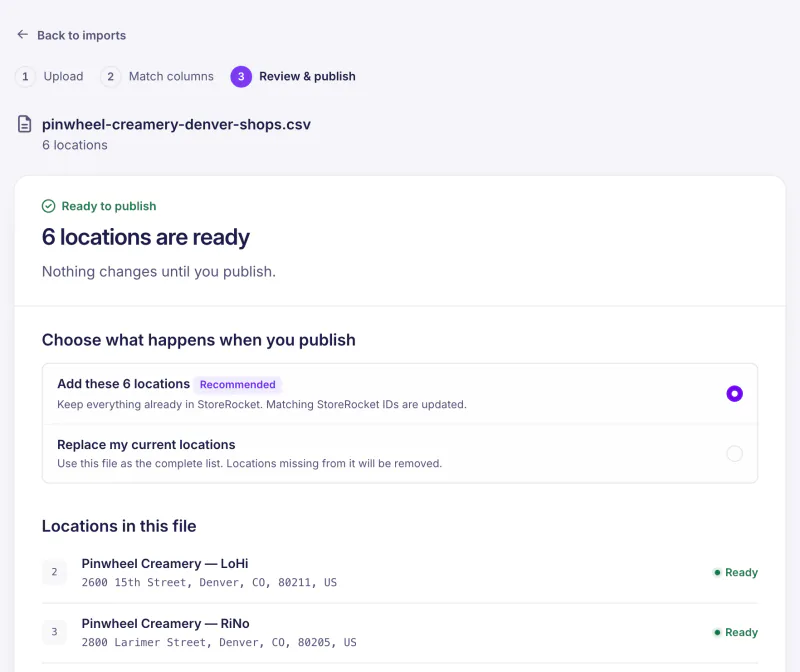
- Spreadsheet import: load your facility list from a CSV or Excel file. In the dashboard, an import shows what will change before you publish it.
- Google Sheets sync (depends on the plan, see pricing): manage a large network in one sheet, synced on demand or once a day.
- Appointment buttons: each location links to your own scheduling page.
- Phone layout: the locator adapts from desktop to phone.
- Analytics (depends on the plan): views, the words people searched for, a map of where they searched and the searches that found nothing nearby.
Step 4: Configure for healthcare
Import locations: import your facility list from a CSV or Excel file, or manage it in a linked Google spreadsheet created by StoreRocket on a plan that includes sync.
Create the filter structure:
Facility type filters:
- Hospital
- Emergency Room
- Urgent Care
- Primary Care
- Specialty
- Imaging Center
- Lab
- Pharmacy
Specialty filters:
- Cardiology
- Dermatology
- Orthopedics
- Pediatrics
- (etc.)
Service filters:
- Accepting new patients
- Walk-ins welcome
- Online scheduling
- Telehealth available
Design:
- Use a clean, clinical look with a clear information hierarchy.
- Keep the phone number and Get Directions easy to find.
- Choose high-contrast colors for readability.
Step 5: Set up appointments and lead capture carefully
For appointment requests:
- Add a “Request an appointment” button to each location that opens your scheduling system.
- Keep patient details in that system, not in the locator.
Lead capture (depends on the plan): when a search finds no location nearby, the locator can show a short form and the lead lands in your dashboard. Keep it minimal: name, email or phone, and no free-text field.
Step 6: Deploy
Copy the embed code from the Install page in your StoreRocket dashboard and paste it into the page where the locator should appear.
Placement:
- “Find a Location” primary navigation
- “Find a Doctor” pages (link to the locator with specialty filters)
- Service line pages
- Footer
Step 7: Train staff
- Scheduling teams: how appointment requests come in
- Marketing: where the analytics are and how to read them
- IT: who owns the embed code on the website
- Facilities: how to request location updates
Healthcare locator best practices
Make emergency care clear
For health systems with ERs:
- Show ER locations prominently.
- Mark them clearly as open 24/7.
- Make them reachable from the homepage.
- Consider “In case of an emergency, call 911” messaging.
Keep “accepting new patients” current
This changes often, so make it easy to update. With Google Sheets sync (depends on the plan), edit the sheet and the locator picks it up once a day, or sync on demand from the dashboard. Show the status in the results and offer it as a filter.
Support care transitions
Patients often need several services. Use custom fields to say what else a location offers, and link related facilities.
Test on a phone
Healthcare searches are often urgent and on a phone. Load the page on a real phone, check that the phone number and directions work, and keep the page light.
Keep the data accurate
Wrong healthcare information is serious. Verify locations on a regular cycle, name an owner for each update and keep one source of truth.
Analytics for healthcare networks
On a plan that includes analytics, StoreRocket shows locator views, the words people searched for, a map of where they searched, the searches that found nothing nearby, clicks per location and leads.
- Search patterns: what patients type into the search box, mostly the towns and postcodes they start from.
- Searches that found nothing nearby: places where patients look for care and you have no site close by.
- Where people searched: compare the map of searches with where your facilities are.
Use that for new facility planning, service line expansion and marketing allocation. Direction requests and calls are not recorded by StoreRocket: see them in your Google Business Profile.
Help patients find care
StoreRocket gives healthcare networks a store locator for their own website: import your locations from a spreadsheet, match it to your brand and paste one embed code. Create your locator with a free trial, no credit card needed.
Frequently Asked Questions
What does a store locator cost to run for healthcare?
It depends on the plan, which is sized by the number of locations: see pricing. You can start with a free trial, no credit card needed. During the trial StoreRocket supplies the map. After you subscribe you connect your own Google Maps or Mapbox key and pay that provider directly for map usage.
Is a location finder HIPAA-compliant?
A location finder displays public facility information (addresses, hours, services), not patient data. StoreRocket makes no compliance claim for your organization, so check your requirements with your compliance team. For appointment request forms, keep information minimal and keep follow-up in your own scheduling system.
Can we show physician information?
Physician names, specialties and office locations are generally public, and you can add them as locations or custom fields. Avoid detailed personal information. Some health systems keep a separate physician directory that links to the locator.
How do we handle telehealth locations?
Add “Telehealth available” as a filter or custom field on physical locations, or add telehealth as a location with a clear label. Consider separating in-person and virtual care.
What about urgent care wait times?
Wait times live in your scheduling or queue system. Add a button to each urgent care location that opens its wait-time page, so patients see the current wait where it is tracked.
How do we handle multi-tenant buildings?
Use suite numbers and building names. Consider individual listings for separate practices even if they share an address.
Patients are looking for care near them right now
Import your locations from a spreadsheet, match the locator to your website, and add it where you would add a video.
7 days free · No card · No automatic charge · see a live locator first