Build your store locator
Import a spreadsheet, match your website, and add it like a video. No credit card required.
A retail store locator has one job: turn a shopper’s search for your nearest store into a visit, with the right address, hours and details for that store. A few stores that rarely change can live on a simple map. A brand with many stores, formats and product lines, and a team that is not made of developers, needs search, filters, an open-now status and a spreadsheet to update everything from, and that is what StoreRocket is built for.
StoreRocket makes only store locators, and we have been building them since 2018. StoreRocket hosts the locator and delivers updates through the embed already on your site, so your team edits stores in the dashboard or a spreadsheet and nobody maintains map code. You can create your locator and load your own stores during the free trial. We make StoreRocket, so weigh our view with that in mind.
Related: What is a store locator? | Store locator ROI guide | Best retail store mapping software | Store locator for golf brands | Store locator for mattress brands
The short answer
A simple map is enough when
- You have a handful of stores whose details rarely change.
- Shoppers only need to see where the stores are, not filter by format, product line or service.
- You do not need to see what people search for or where you have no store.
- A developer is happy to edit the page whenever a store opens, closes or changes hours.
Use StoreRocket when
- You have many stores in different formats, such as flagships, outlets and shop-in-shops, and shoppers filter by format, product line or service.
- Hours differ by store and shoppers should see Open Now or Closed in each store’s own time zone.
- Store managers or marketing, not developers, keep stores current from a spreadsheet.
- You want to see what people search for, where they search and which searches found no store nearby (depends on the plan).
Only a few locations and no budget? You may not need a store locator at all. A free embedded map with a pin for each location is fine when the list is short, rarely changes and visitors only need to see where you are. Our guide to free store locator options compares them.
Why retail brands need a store locator
Customers find stores online first
- Local intent: people search Google for places they can visit
- Close to a visit: someone searching for a nearby store is often ready to go
When someone searches "shoe store near me" or "where to buy [your brand]," a locator on your website gives them your nearest store, with its hours and details.
Beyond Google Maps
Google Business Profiles are essential, but your own website adds things they don't:
You control the experience. The design is yours, with your colors and map markers.
You see the demand. On a plan with analytics you can see what people searched for, and where.
You guide the journey. You can filter by format or product, put priority stores first (depends on the plan) and capture leads.
A dedicated store locator on your website complements Google, giving you control, data, and conversion opportunities.
What Makes a Great Retail Store Locator
Essential Features
1. Intuitive Search
Customers search by:
- Zip code / postal code
- City name
- "Use my location" (GPS)
- Street address
Results are sorted by distance from the search.
2. Mobile-First Design
Many shoppers search on their phones. Look for:
- A phone layout that adapts from the desktop map
- A phone number on each listing, tappable in the location’s details
- Directions that open in Google Maps
3. Complete Store Information
Each listing needs:
- Address
- Phone number
- Store hours
- "Get Directions" link
- Store-specific details (services, products)
4. Filters and Categories
Let customers narrow results:
- Store format (Flagship, Outlet, Mall)
- Product categories
- Services (Alterations, Personal shopping)
- Features (Curbside pickup, Parking)
5. Brand Consistency
Your store locator should match your website:
- Your colors
- Your typography feel
- Your brand's visual language
A locator that looks like your website feels like part of your brand.
High-Value Features
1. Analytics and a search map (depends on the plan)
See where people are searching. Identify:
- Where people searched
- Searches that found no store nearby
- Clicks on each store
- What shoppers type
2. Lead capture (depends on the plan)
Turn a search with no store nearby into a contact:
- A short form appears when nothing is near the visitor
- You choose the fields and write the heading, for example "Tell us where you'd like to find us"
- Each submission lands on your Leads page in the dashboard
3. Spreadsheet sync (depends on the plan)
Update store information from a spreadsheet. Changes sync once a day or on demand, with no manual re-importing. See pricing.
Store Locator ROI for Retail
Measuring Success
From StoreRocket:
- Store locator page views
- Searches, and the searches that found nothing nearby
- Clicks per location
- Lead form submissions
From your Google Business Profile:
- Direction requests and calls
Metrics to correlate:
- Foot traffic changes
- In-store sales attribution
- Customer survey: "How did you find us?"
Work out your own return
Use your own numbers, not an industry average. Take the number of locator searches in a month from your analytics. Multiply by the share of searchers who go on to visit one of your stores, then by the share of visitors who buy, then by your average sale and your margin. Compare that profit with what the locator costs you to run, including the map provider and the time your team spends on it. Each share is yours to measure, from a checkout survey, a coupon code or your own foot-traffic counts. Our store locator ROI guide walks through how to measure it.
Implementing a Retail Store Locator
Step 1: Audit Your Store Data
Before choosing software, get your data in order:
Required per store:
- Official store name
- Complete address (for geocoding)
- Phone number
- Regular hours (Mon-Sun)
Recommended:
- Store manager/contact
- Email address
- Store format/type
- Products carried
- Services offered
- Photos
Create a single source of truth, usually a spreadsheet, before proceeding.
Step 2: Choose Your Platform
For retail brands, StoreRocket offers:
- Google Sheets sync, once a day or on demand (depends on the plan, see pricing)
- Analytics and a search map (depends on the plan)
- Lead capture when a search finds no store nearby (depends on the plan)
- Filters for store formats and products
- Your colors, fonts and map markers
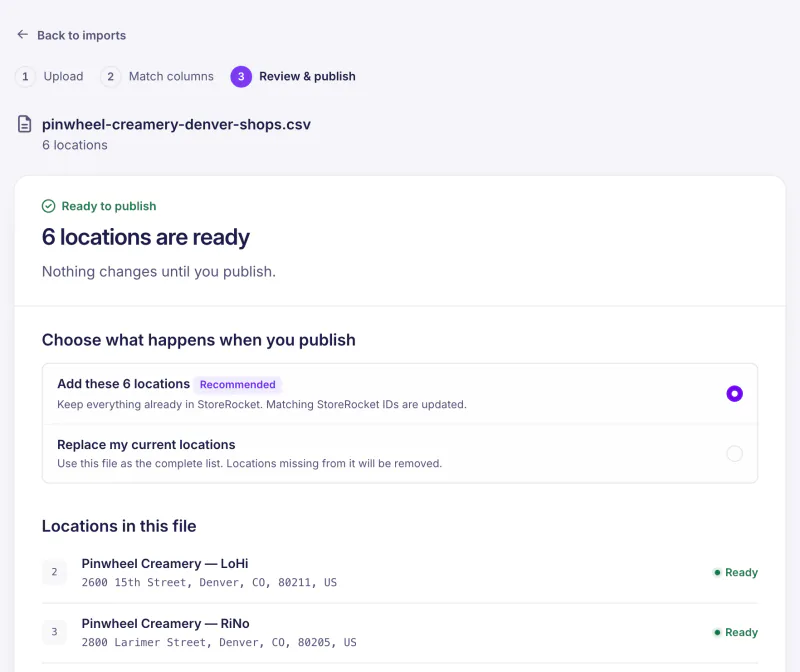
Step 3: Import and Organize
Using Google Sheets sync:
- Import your existing spreadsheet as a CSV or Excel file
- Open Google Sheets Sync in StoreRocket and create a new linked spreadsheet
- StoreRocket exports your locations and emails you the spreadsheet link
- Edit that linked spreadsheet using its template columns
- Enable automatic daily sync, or click Sync from Sheets after editing
Continuous sync uses the spreadsheet created by StoreRocket. Follow the Google Sheets setup guide.
Now your store data lives in one place, the spreadsheet, and your locator updates from it once a day, or on demand.
Set up filters:
- Create store format categories
- Add product line filters
- Include service offerings
Step 4: Design and Brand
- Choose a theme matching your aesthetic
- Set your brand colors
- Upload custom markers if desired
- Configure default search radius
Step 5: Enable Analytics and Lead Capture
Analytics setup:
- On a plan with analytics, views, searches and clicks are recorded from launch
- Read the search map for where people searched, not just where your stores are
- Watch the searches that came back with nothing nearby, and the click total per location
Lead capture (depends on the plan):
- Turn on the form that appears when a search finds no store nearby
- Choose its fields and write its heading
- New leads arrive on your Leads page
Step 6: Deploy
Copy the embed code from the Install page in your StoreRocket dashboard and paste it into the page where the locator should appear.
Create dedicated pages:
- /stores or /locations
- Add to main navigation
- Link from footer
- Include in local SEO strategy
Step 7: Monitor and Optimize
Weekly:
- Check search volume trends
- Review any customer feedback
Monthly:
- Read the search map for patterns
- Assess lead capture performance
- Compare to foot traffic data
Quarterly:
- Strategic coverage review
- Consider expansion based on search data
- Evaluate new features
Retail Store Locator Best Practices
Make It Findable
- Name the page clearly: "Find a Store" or "Store Locations"
- Add to main navigation
- Include in footer
- Link from product pages: "Find this in-store"
Optimize for Mobile
- Test on actual phones
- Check that the use-my-location option works
- Make "Get Directions" easy to find
- Keep the page light
Keep Data Fresh
- Update hours whenever a store changes them
- Announce new stores quickly
- Remove closed locations immediately
- Regular audits (monthly minimum)
Use Search Data
- Identify high-demand, low-coverage areas
- Adjust marketing by geography
- Inform real estate decisions
- Tailor local promotions
Connect Online and Offline
- Product pages that open the locator filtered to the stores carrying that line
- "Find in-store" buttons in marketing emails
- Social ads targeting searchers' regions
- QR codes in-store linking to locator
Common Retail Store Locator Mistakes
Mistake 1: Outdated Information
Nothing frustrates customers more than wrong hours or closed stores. Use the daily Google Sheets sync, or sync on demand from the dashboard, to prevent this.
Mistake 2: Poor Mobile Experience
If your locator is clunky on phones, shoppers give up on it. Test on real phones before you publish.
Mistake 3: No Analytics
Without data, you can't improve.
Mistake 4: Generic Design
A store locator that looks like default Google Maps doesn't reinforce your brand. Customize.
Mistake 5: Hiding It
If customers can't find your store locator, they can't find your stores. Make it prominent.
Mistake 6: No Call to Action
After showing store locations, what do you want customers to do? Visit? Call? Sign up for emails? Make it clear.
Frequently Asked Questions
What does a store locator cost to run for a retailer?
It depends on the plan, which is sized by the number of locations: see pricing. You can start with a free trial, no credit card needed. During the trial StoreRocket supplies the map. After you subscribe you connect your own Google Maps or Mapbox key and pay that provider directly for map usage.
How important is a store locator for omnichannel retail?
Customers research online, visit stores and buy through several channels. A store locator connects digital research to physical visits.
Should we use Google Maps or Mapbox?
For most retail, either works. Google Maps is familiar to customers. StoreRocket supports both Google Maps and Mapbox: you pick one for your account and can switch later by pasting the new install code. After the trial, the map runs on your own Google Maps or Mapbox key, billed by that provider.
How do we track if locator searches become store visits?
Directly attributing digital searches to physical visits is challenging. Options:
- "How did you find us?" survey at checkout
- Location-based ad retargeting
- Coupon codes from locator page
- Foot traffic analytics (expensive but accurate)
What about inventory visibility?
Show which stores carry which product lines with filters (for example "Footwear" or "Outlet range"), and link each product page to the locator already filtered to that line. Keep the tags current from your spreadsheet, or update locations through the REST API on a plan that includes it.
How often should we update store information?
With Google Sheets sync: daily. Without sync: audit monthly, update immediately for any closures or hour changes.
Get started with your retail store locator
StoreRocket gives retail brands a store locator for their own website: import your stores from a spreadsheet, match it to your brand and paste one embed code. Create your locator with a free trial, no credit card needed.
Questions about your retail locator? Message us.
Shoppers are looking for your nearest store right now
Import your locations from a spreadsheet, match the locator to your website, and add it where you would add a video.
7 days free · No card · No automatic charge · see a live locator first