Build your restaurant locator
Import a spreadsheet, match your website, and add it like a video. No credit card required.
A restaurant locator has one job: show a hungry person your nearest location, whether it is open and what to do next, such as book a table or order. One or two restaurants with fixed hours can live on a simple map. A chain, franchise or group with different hours, offerings and booking pages per location needs an open-now status, filters guests can tick and a way to update your locations from one place, and that is what StoreRocket is built for.
StoreRocket makes only store locators, and we have been building them since 2018. StoreRocket hosts the locator and delivers updates through the embed already on your site, so your team edits locations in the dashboard or a spreadsheet and nobody maintains map code. You can create your locator and load your own locations during the free trial. We make StoreRocket, so weigh our view with that in mind.
Related: What is a store locator? | How to increase foot traffic
The short answer
A simple map is enough when
- You run one or two restaurants and the hours rarely change.
- Guests only need the address, phone number and a link to your booking or ordering page.
- Nobody needs to filter by dine-in, takeout, patio or private dining.
- A developer or manager is happy to edit the page each time a location changes.
Use StoreRocket when
- You have a chain, franchise or group where hours, offerings and booking pages differ by location.
- Guests should see Open Now or Closed in each restaurant’s own time zone, and filter by offerings such as patio, brunch or private dining.
- Each location needs its own “Book a table” or “Order online” button.
- Managers who are not developers keep hours and locations current from the dashboard or a spreadsheet.
Only a few locations and no budget? You may not need a store locator at all. A free embedded map with a pin for each location is fine when the list is short, rarely changes and visitors only need to see where you are. Our guide to free store locator options compares them.
Why restaurants need a location finder
The mobile dining decision
Restaurant searches are mobile and immediate:
- On a phone: people look for somewhere to eat while they're out
- Right before the meal: the search and the visit happen close together
- Close by: diners choose from what's near them
Someone who searches "[your brand] locations" is ready to pick a place. A locator gives them your nearest one.
Beyond Yelp and Google
You need presence on review sites and Google. But depending solely on them means:
- You're surrounded by competitors. Google shows alternatives right next to you.
- You don't see the demand. What were people looking for, and where?
- You can't feature what matters. Happy hour? New menu? Private dining? You control the message.
A restaurant locator on your website sends interested searchers to your locations, with the booking or ordering link beside each one.
Essential Features for Restaurant Locators
1. Quick Location Search
Guests need to find locations fast:
- Zip code search
- City search
- GPS "near me"
- Distance from search point
Results are sorted by distance from the search.
2. Mobile Excellence
Many guests use the locator on a phone. Look for:
- A phone layout that adapts from the desktop map
- A phone number on each listing, tappable in the location’s details
- Directions that open in Google Maps
3. Hours and Availability
For restaurants, hours matter enormously:
- Regular hours for every day of the week
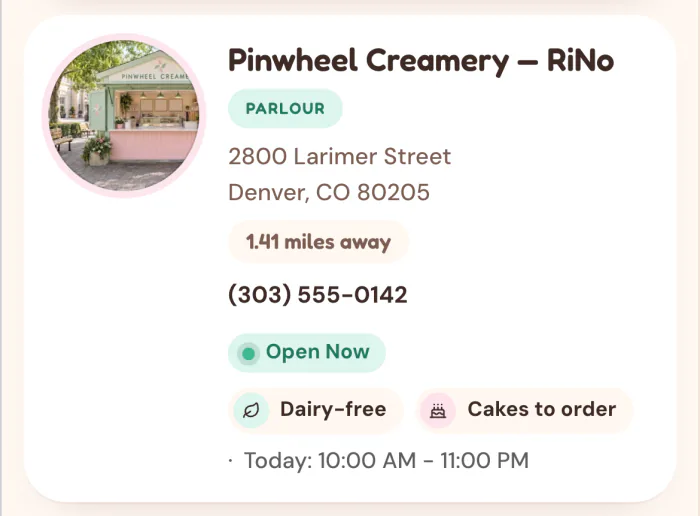
- An "Open now" label on each result
- Brunch, happy hour and late-night service as filters guests can tick
Enter weekly hours for each location and the result shows Open Now or Closed, worked out in that location’s own time zone. Open Now is a status on the result, not a filter, and hours are weekly: they do not cover holiday or special hours. Brunch and happy hour are filters you create.
4. Reservations
If you take reservations, link directly:
- A "Book a table" button on each location
- It opens that restaurant's OpenTable or Resy page
- Or your own reservation system
5. Menu and Specialties
Help guests know what to expect:
- Menu link
- Location-specific offerings
- Dietary options (vegan, gluten-free)
- Signature dishes
6. Visual Appeal
Restaurants are visual businesses:
- Location photos
- Ambiance shots
- Food imagery
- Consistent brand feel
Restaurant-Specific Use Cases
Restaurant Chains
Need: Consistent experience across dozens/hundreds of locations.
Key features:
- Bulk management via Google Sheets sync (depends on the plan)
- Consistent branding across all locations
- Filters for offerings (drive-thru, dine-in, bar)
- Regional menu variations
Fast Casual Brands
Need: Quick service emphasis, order-ahead links.
Key features:
- "Order now" buttons
- Mobile ordering links
- A "Join rewards" button that opens your loyalty sign-up
Fine Dining Groups
Need: Sophisticated presentation, reservation focus.
Key features:
- A "Private dining" button that opens your events inquiry form
- Event space filters
- Chef-driven content
- Premium design aesthetic
Franchise Operations
Need: Support franchisees while maintaining brand consistency.
Key features:
- Franchisee contact information
- Location-specific promotions
- Centralized data management
Implementing a Restaurant Locator
Step 1: Gather Location Data
For each location, collect:
Required:
- Restaurant name
- Full address
- Phone number
- Hours (all days)
Recommended:
- Website (if location-specific)
- Reservation link
- Menu link
- Photos
- Features (patio, bar, private dining)
- Cuisine type/specialty
Step 2: Choose Your Platform
For restaurants, StoreRocket offers the features that matter:
- Google Sheets sync (depends on the plan, see pricing): update hours across locations from one spreadsheet
- Analytics and a search map (depends on the plan): see where people searched
- "Book a table" and "Order online" buttons: each location links to its own reservation or ordering page
- Lead capture (depends on the plan): when a search finds no restaurant nearby, guests can leave their details and the lead lands in your dashboard
- Phone layout: the locator adapts from the desktop map to a phone
Step 3: Import and Configure
Set up Google Sheets sync (depends on the plan):
- Import your existing spreadsheet as a CSV or Excel file
- Open Google Sheets Sync in StoreRocket and create a new linked spreadsheet
- StoreRocket exports your locations and emails you the spreadsheet link
- Edit that linked spreadsheet using its template columns
- Enable automatic daily sync, or click Sync from Sheets after editing
Continuous sync uses the spreadsheet created by StoreRocket. Follow the Google Sheets setup guide.
Create filters:
- Dining options (Dine-in, Takeout, Delivery)
- Atmosphere (Family-friendly, Bar scene, Romantic)
- Service (Brunch, Lunch, Dinner, Late-night)
- Features (Patio, Private dining, Happy hour)
Step 4: Brand and Design
- Match your restaurant's visual identity
- Use appetizing imagery
- Ensure consistent feel with your website
Step 5: Enable Key Features
Calls to action:
- A "Book a table" button on each location that opens its reservation page
- A "Private dining" button that opens your events inquiry form
Lead capture (depends on the plan):
- Turn on the form that appears when a search finds no restaurant nearby
- Write its heading, for example "Get notified when we open near you"
- Each submission arrives on your Leads page
Analytics (depends on the plan):
- What guests searched for, and a map of where
- Searches that found no restaurant nearby
- Clicks on each location
Step 6: Deploy and Promote
Copy the embed code from the Install page in your StoreRocket dashboard and paste it into the page where the locator should appear.
Link from:
- Main navigation
- "Locations" page
- Order online pages
- Reservation pages
- Marketing emails
Optimizing for Restaurant Search Behavior
What guests search for
Common queries:
- "[cuisine] near me"
- "[brand name] locations"
- "restaurants open now"
- "[brand] + [city]"
Check it on a phone
Test your locator on a real phone before you publish:
- Does the use-my-location option work?
- Can you reach the phone number in the location’s details?
- Do directions open in Google Maps?
- Does the page load well on cellular?
Keep hours right
Wrong hours send guests to a closed door. Restaurant hours change:
- Seasonally
- For events
- For construction or remodeling
With Google Sheets sync (depends on the plan), you update every location’s weekly hours in one spreadsheet. Hours are weekly, so put holiday changes in a custom field such as “Holiday hours” and clear it afterwards.
Restaurant Locator Analytics
What to Track
On a plan that includes analytics, StoreRocket records:
Volume metrics:
- Locator views and searches, with the words typed
- A map of where people searched
- Searches that found no restaurant nearby
Engagement metrics:
- Clicks per location
Direction requests and calls are not recorded by StoreRocket: see them in your Google Business Profile. Track covers and event inquiries in your own booking system.
Using the search map for growth
The map of where people searched can show:
- Many searches, few locations: expansion opportunities
- Many searches, many locations: where marketing may pay off
- Few searches: either saturated or needing promotion
Use it to inform:
- New location planning
- Marketing budget allocation
- Promotion targeting
Booking and Ordering Links
Each location can carry buttons, and each one opens a page you choose.
Reservation Systems
Link directly to:
- OpenTable
- Resy
- Yelp Reservations
- Your own booking system
Make "Book a table" prominent on each location.
Online Ordering
Link each location to its page on:
- ChowNow
- Toast
- Square
- DoorDash (direct)
- Your online ordering platform
"Order now" should be one tap away.
Loyalty Programs
- A "Join rewards" button that opens your loyalty sign-up page
Frequently Asked Questions
What does a store locator cost to run for a restaurant?
It depends on the plan, which is sized by the number of locations: see pricing. You can start with a free trial, no credit card needed. During the trial StoreRocket supplies the map. After you subscribe you connect your own Google Maps or Mapbox key and pay that provider directly for map usage.
How is a restaurant locator different from a store locator?
The core functionality is similar, but restaurants emphasize:
- Hours (especially open now)
- Reservation buttons
- Menu links
- Visual appeal
- Mobile urgency
Should we show menu prices?
Usually not in the locator itself. Link to the full menu instead. Locators should help guests find you and take action.
How do we handle seasonal locations?
Google Sheets sync (depends on the plan) makes this easy:
- Tag seasonal locations with a "Seasonal" filter
- Update their hours in your spreadsheet when the season changes
- The locator picks up the change at the next daily sync, or when you sync on demand
What about delivery zones?
For delivery-focused brands, you might:
- Add a custom field such as “Delivery area”
- Link to delivery ordering
- Indicate delivery vs pickup-only locations
Get hungry customers to your tables
StoreRocket gives restaurants a store locator for their own website: import your locations from a spreadsheet, match it to your brand and paste one embed code. Create your locator with a free trial, no credit card needed.
Questions about a locator for your restaurant group? Message us.
Hungry diners are looking for you right now
Import your locations from a spreadsheet, match the locator to your website, and add it where you would add a video.
7 days free · No card · No automatic charge · see a live locator first