Build your pharmacy locator
Import a spreadsheet, match your website, and add it like a video. No credit card required.
A pharmacy locator has one job: show a patient the nearest pharmacy that is open now and offers what they need, whether that is a prescription, a vaccination or a 24-hour counter. A few pharmacies with fixed hours can live on a simple map. A chain or network with different hours, services and formats per location needs weekly hours with an Open Now status, filters for services and a way to keep each location current without a developer, and that is what StoreRocket is built for.
StoreRocket makes only store locators, and we have been building them since 2018. StoreRocket hosts the locator and delivers updates through the embed already on your site, so your team edits locations in the dashboard or a spreadsheet and nobody maintains map code. You can create your locator and load your own pharmacy list during the free trial. We make StoreRocket, so weigh our view with that in mind.
Related: What is a store locator? | Healthcare location finder
The short answer
A simple map is enough when
- You run one pharmacy or a few with the same hours every day.
- Patients only need the address and phone number.
- Nobody needs to filter by service, insurance or 24-hour access.
- A developer is happy to edit the page whenever hours or services change.
Use StoreRocket when
- Hours differ by pharmacy and a patient should see Open Now or Closed in that pharmacy’s own time zone.
- Patients filter by what they need: vaccinations, compounding, delivery, drive-through or a 24-hour counter.
- Your network mixes formats, such as standalone, in-store and specialty, each with its own marker.
- Staff who are not developers keep hours and services current from a spreadsheet.
Only a few locations and no budget? You may not need a store locator at all. A free embedded map with a pin for each location is fine when the list is short, rarely changes and visitors only need to see where you are. Our guide to free store locator options compares them.
Why pharmacy locators matter
Healthcare Access
Patients need a pharmacy that is close, open and able to help:
- Regular prescriptions make the pharmacy a routine stop
- Rural areas can have limited pharmacy options
- Specialty medications require specific pharmacy types
A pharmacy locator helps patients find the right pharmacy quickly.
The Retail Pharmacy Landscape
The pharmacy market is diverse:
| Pharmacy Type | Examples |
|---|---|
| Chain drugstores | CVS, Walgreens |
| Grocery pharmacy | Kroger, Publix, Safeway |
| Mass merchant | Walmart, Target, Costco |
| Independent | Local community pharmacies |
| Mail order | Express Scripts, OptumRx |
| Specialty | Accredo, CVS Specialty |
| Compounding | Custom medication preparation |
| Hospital/clinic | Health system pharmacies |
For Pharmaceutical Companies
Drug manufacturers need locators to show:
- Where their products are available
- Specialty pharmacy access for complex medications
- Vaccination and injection sites
- Patient support program locations
Essential Pharmacy Locator Features
Search Functionality
Location-based search:
- A use-my-location option for immediate needs
- Zip code and city search
- Address search for specific areas
- A search distance you set, in miles or kilometres
Service-based search:
- Pharmacies with specific services, as filters
- 24-hour access, as a filter you create
- Drive-through availability
- Specialty medication capability
Pharmacy Information Display
Essential information:
- Pharmacy name and brand
- Full address with map
- Phone number
- Weekly hours (one set per location; list an in-store clinic as its own location)
- Distance from search
Healthcare-specific:
- Services offered
- Insurance accepted
- Specialty certifications
- Vaccination availability
- Languages spoken
Useful filters
Create filters that match how patients choose a pharmacy. Open Now is shown as a status on each result, so a filter such as “24-hour” adds what a status cannot.
| Filter Category | Options |
|---|---|
| Hours | 24-hour, Weekend, Evening |
| Services | Vaccinations, Compounding, Delivery |
| Insurance | Medicare, Medicaid, Major insurers |
| Specialty | Oncology, HIV, Fertility, etc. |
| Convenience | Drive-through, Curbside, Mail |
| Languages | Spanish, Chinese, Other |
For Retail Pharmacy Chains
Multi-Format Challenges
Large pharmacy chains operate:
- Standalone drugstores
- In-store (within grocery/mass merchant)
- Clinic locations
- Mail order facilities
Each format needs appropriate display and filtering.
Service Differentiation
Not all locations offer all services:
- Immunizations and vaccinations
- Clinical services
- Photo processing
- DME (medical equipment)
- Specialty medications
Filters help patients find what they need.
Clinic Integration
Retail clinics inside or next to a pharmacy, each listed as its own location with its own weekly hours:
- Different hours than the pharmacy
- Appointment vs. walk-in
- Services offered vary
- Integration with pharmacy services
24-Hour Locations
Patients searching late at night need these most:
- A clear "24 Hour" designation
- A 24-hour filter you create
- The open-or-closed status on each result
- Emergency medication access
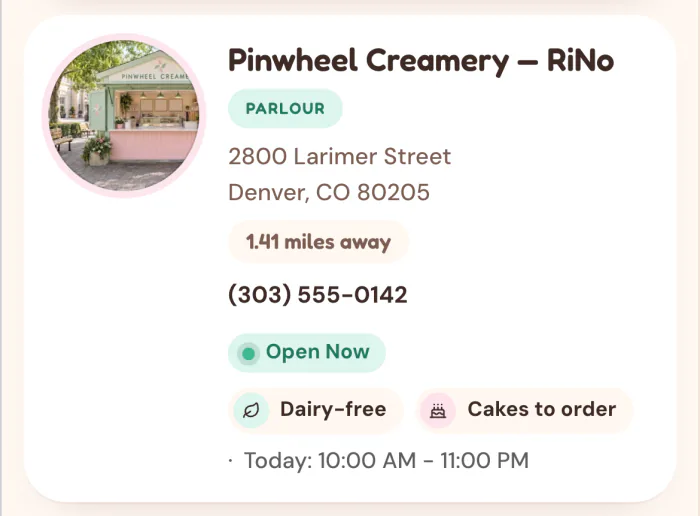
Enter weekly opening hours for each pharmacy and the result shows Open Now or Closed, worked out in that pharmacy’s own time zone.
For Pharmaceutical Companies
"Where to Get This Medication" Locators
Drug manufacturers need to show:
- Retail availability for OTC products
- Pharmacy access for prescriptions
- Specialty pharmacy network for complex drugs
- Patient support program locations
Specialty Pharmacy Networks
For specialty medications (biologics, oncology, etc.):
- Limited distribution networks
- Certification requirements
- Patient support integration
- Insurance/access programs
Vaccination Site Locators
Especially relevant for:
- Flu vaccines
- COVID-19 vaccines
- Travel vaccines
- Childhood immunizations
Patient Support Programs
Show locations for:
- Patient assistance enrollment
- Injection training
- Nurse support
- Financial assistance
Compliance and Healthcare Regulations
HIPAA Considerations
A locator shows public pharmacy information, not patient records. StoreRocket makes no compliance claim for your organization, so check your requirements with your compliance team. If you collect any details, consider:
- Lead capture data handling
- Integration with patient portals
- Secure data transmission
- Privacy policy clarity
State Pharmacy Regulations
Pharmacy practice varies by state:
- Pharmacist counseling requirements
- Controlled substance rules
- Telepharmacy regulations
- Vaccination authority
Accessibility Requirements
Healthcare sites carry accessibility obligations:
- Check your site against the standards that apply to you
- Use clear language
- Show accessibility details for each pharmacy
- Offer alternative ways to contact the pharmacy
Drug-Specific Regulations
Some medications have special requirements:
- REMS (Risk Evaluation and Mitigation Strategies)
- Controlled substance limitations
- Specialty pharmacy certification
- Patient registration requirements
Mobile Experience for Patients
Why Mobile is Critical
Pharmacy searches often happen on a phone, for example when someone is sick, traveling or checking whether a pharmacy is open. Check the locator on a real phone before you publish.
Essential Mobile Features
Phone number: shown on each location, tappable in the location’s details.
Directions: open the route in Google Maps.
Hours display: the Open Now or Closed status on each result.
Service verification: filters and custom fields show what each pharmacy offers.
App Integration
Major pharmacy chains have apps:
- Prescription management
- Refill requests
- Store locator built-in
A web locator complements an app for people who do not have it installed.
Inventory and Availability
Showing what a pharmacy offers
Stock for a specific medication lives in your pharmacy system. A locator shows what each location offers: services, specialty access and vaccine availability, kept current in a custom field. For live stock, add a button to the location that opens the page in your own system.
Implementation Approaches
Basic: show pharmacy type and services
Intermediate: Indicate general capabilities, such as "vaccines available", with a filter or a custom field kept current from your spreadsheet or the REST API
Vaccine Availability
Particularly important for:
- Flu season
- COVID-19 boosters
- Travel vaccines
- Childhood immunizations
Showing which locations offer the vaccine makes it easier for patients to find one.
Insurance
Insurance Network Display
Help patients find in-network pharmacies:
- Major insurer networks
- Medicare Part D
- Medicaid
- Pharmacy benefit managers
Patient Assistance
For pharmaceutical companies:
- Co-pay assistance program locations
- Patient assistance enrollment sites
- Foundation support access
Analytics for Pharmacy Businesses
Key Metrics
On a plan that includes analytics, StoreRocket records:
Views and searches: how many patients are using the locator and the words they typed.
Where people searched: a map of the places they searched from.
Searches that found nothing nearby: places where patients look for a pharmacy and you have none close.
Clicks per location.
Business applications
Network planning: compare where people searched with where your locations are.
Service planning: read the words patients type to see which services they ask for.
SEO for Pharmacy Locators
Search Behavior
Patients search for:
- "Pharmacy near me"
- "24-hour pharmacy [city]"
- "[Brand] pharmacy locations"
- "Where to get [vaccine]"
- "Pharmacy open now"
Local Pack Optimization
Pharmacy searches often show Google's Local Pack:
- Claim and optimize Google Business Profile
- Consistent NAP across web
- Encourage reviews
- Regular GBP posting
Lead Capture for Pharmacies
What the Lead Form Does
Lead capture (depends on the plan): when a search finds no pharmacy nearby, visitors can leave their details and the lead lands in your dashboard. You choose the fields (name, email, phone, comment) and write the heading, for example "Tell us where you'd like a pharmacy".
For vaccination appointments, prescription transfers or new patient registration, add a button to each pharmacy that opens your own booking page or form.
Privacy and Consent
Be clear about:
- What data is collected
- How it will be used
- HIPAA applicability
- Marketing consent
Getting Leads Out
Each submission arrives on the Leads page of your dashboard, with what the visitor searched for. Your developers can also pull leads into other systems through the REST API (depends on the plan).
Implementation with StoreRocket
How Pharmacies Use StoreRocket
Location management:
- Import all pharmacies from a CSV or Excel file. In the dashboard, an import shows what will change before you publish it.
- Google Sheets sync for updates (depends on the plan)
- Weekly opening hours on every pharmacy, plus custom fields for details like services
- Different location types (depends on the plan)
Service filters:
- 24-hour filter
- Service availability
- Insurance networks
- Specialty certifications
Design:
- Your colors, fonts and map markers
- A phone layout
Analytics (depends on the plan):
- Search volume and the words typed
- A map of where people searched
- Searches that found no pharmacy nearby
Implementation Checklist
Data Preparation
- All pharmacies with verified addresses
- Weekly hours of operation (one set per location)
- Services offered per location
- Insurance networks
- Phone numbers verified
- Special designations (24-hour, etc.)
Configuration
- Relevant filters created
- Lead capture (if applicable) configured
- Brand styling applied
- Phone layout tested on a real phone
Launch
- Embed code added to website
- Navigation updated
- Search functionality verified
- All filters working
- Analytics tracking confirmed
Ongoing
- Regular hours verification
- Service changes updated
- New location additions
- Closed location removal
- Holiday changes noted in a custom field such as "Holiday hours", cleared afterwards (hours are weekly)
Common Challenges
Data Accuracy
Challenge: Pharmacy information changes frequently.
Solution:
- Regular data audits
- Integration with source systems
- Clear update processes
- Google Sheets sync for easy updates
Service Verification
Challenge: Not all pharmacies offer all services.
Solution:
- Comprehensive service tagging
- Clear filter options
- Regular service verification
- Patient feedback incorporation
Insurance Complexity
Challenge: Insurance acceptance varies.
Solution:
- High-level network indicators
- Link to insurance verification
- Clear "call to confirm" messaging
- Regular network updates
Get your pharmacy locator live
StoreRocket gives pharmacies a store locator for their own website: import your locations from a spreadsheet, match it to your brand and paste one embed code. Create your locator with a free trial, no credit card needed.
Frequently Asked Questions
What does a store locator cost to run for a pharmacy?
It depends on the plan, which is sized by the number of locations: see pricing. You can start with a free trial, no credit card needed. During the trial StoreRocket supplies the map. After you subscribe you connect your own Google Maps or Mapbox key and pay that provider directly for map usage.
Can we show different pharmacy types (retail, specialty, mail order)?
Yes. Tag each pharmacy by type and give each type its own map marker. Patients can filter to find exactly the pharmacy type they need.
How do we indicate 24-hour pharmacies?
Create a “24-hour” filter and give those locations their own marker. The Open Now status on each result helps patients see which pharmacies are available when they search.
Can patients search for specific services like vaccinations?
Absolutely. Create filters for immunizations, compounding, DME, clinical services, and other offerings. Patients filter to find pharmacies with the services they need.
Is the pharmacy locator accessible for patients with disabilities?
Test the locator against the standard you are held to, such as WCAG or Section 508, during the free trial, with a keyboard and a screen reader, before you launch, and tell us the level you need. The theme's colors are configurable if you need to meet a contrast target, and the locator is a script embed rather than a hosted page, so it sits inside your own site's navigation and layout on most platforms.
How do we handle vaccine availability?
Use custom fields to indicate vaccine availability by location, or add a button that opens your appointment scheduling system. Update the field as availability changes.
Questions about your pharmacy locator? Message us.
Patients are looking for a pharmacy right now
Import your locations from a spreadsheet, match the locator to your website, and add it where you would add a video.
7 days free · No card · No automatic charge · see a live locator first