Build your where-to-buy locator
Import a spreadsheet, match your website, and add it like a video. No credit card required.
A beverage locator answers one question: where can I buy this, or drink it, near me? A short list of retailers that rarely changes can live on a simple map. A brand sold through distributors into liquor stores, grocery, bars and restaurants, with different products and formats at each, needs filters for channel and product, an on-premise and off-premise split, a “Buy online” button for customers far from a retailer and a spreadsheet that follows distributor updates, and that is what StoreRocket is built for.
StoreRocket makes only store locators, and we have been building them since 2018. StoreRocket hosts the locator and delivers updates through the embed already on your site, so your team edits retailers in the dashboard or a spreadsheet and nobody maintains map code. You can create your locator and load your own retailer list during the free trial. We make StoreRocket, so weigh our view with that in mind.
Related: What is a store locator? | Store locator ROI guide | Store locator for retail | Grappos alternative | Best product locator software
The short answer
A simple map is enough when
- You sell through a short list of retailers, or one distributor, that rarely changes.
- Customers only need to see where to buy, not which store carries which flavor.
- You have no on-premise and off-premise split to explain.
- A developer is happy to edit the page whenever a retailer is added or dropped.
Use StoreRocket when
- Distributors send you retailer lists, and you need to load them from a spreadsheet without a developer.
- Customers filter by channel, such as liquor store, grocery, bar or restaurant, and by product, pack size or flavor.
- You want “where to buy” and “where to drink” in one locator, with a “Buy online” button for customers far from a retailer.
- You want to see where people searched and found no stockist nearby, to decide where to push distribution (depends on the plan).
Only a few locations and no budget? You may not need a store locator at all. A free embedded map with a pin for each location is fine when the list is short, rarely changes and visitors only need to see where you are. Our guide to free store locator options compares them.
Why Beverage Brands Need a Store Locator
The "Where to Buy" Moment is Critical
Beverage customers don't browse, they buy when they want a drink:
- Someone tries a craft beer at a bar and wants to buy a six-pack
- A guest loves the tequila at a party and wants their own bottle
- A health-conscious shopper sees a new kombucha on Instagram
- A coffee lover discovers a brand and wants to find it locally
In all cases, the question is the same: "Where can I buy this?" Answer it on your own site, and the customer finds your product instead of choosing whatever is nearby.
Beverage Distribution is Fragmented
Unlike direct-to-consumer products, beverages flow through complex distribution:
- Alcohol moves through distributors to retailers (in the US, usually required by law)
- Soft drinks go through bottlers, distributors, and multiple retail channels
- Coffee sells through cafés, grocery, specialty stores, and more
- Water and wellness drinks land in grocery, convenience, gyms, and health stores
This fragmentation makes it hard for customers to find your product. A store locator cuts through the complexity.
Your Distributors and Retailers Want Help
Retail partners appreciate brands that drive traffic to their stores. A "Find Where to Buy" page:
- Sends qualified customers to retail partners
- Supports distributor relationships
- Provides data on where customers want to find your product
- Demonstrates investment in retail channel success
What Makes a Great Beverage Store Locator
Essential Features for Drink Brands
1. Fast Product Finder
Customers search by:
- Zip code / postal code
- City or neighborhood
- GPS "Use my location"
- Retailer name
Results should be instant with clear distance indicators.
2. Retailer Type Filters
Let customers narrow by:
- Channel (Liquor store, Grocery, Bar/Restaurant, Convenience)
- Product format (Cans, Bottles, Draft, Kegs)
- Pack size (Single, 6-pack, Case)
- Availability (Stocks it vs. can order it in)
3. Complete Retailer Information
Each listing needs:
- Store name and address
- Phone number
- Weekly opening hours, with Open Now worked out in each store's own time zone
- "Get Directions" one-click
- Which products/SKUs are carried
- Pricing if available
- Link to retailer for online ordering
4. Mobile-First Design
Beverage searches are impulse-driven, often mobile:
- Thumb-friendly interface
- Map-first results
- Directions that open in Google Maps
5. Product-Centric Search
Beverage brands often have multiple SKUs:
- Filter by specific product/flavor
- Filter by product line
- Show which locations carry which variants
- Highlight new releases
High-Value Features for Beverage Brands
1. Analytics and a search map (depends on the plan)
Understand demand:
- Where people searched
- Areas with searches but no retailers (distribution gaps!)
- Compare where people searched across date ranges, for example summer against winter
2. "Buy Online" Buttons
Not everyone wants to drive to a store:
- A "Buy online" button on each retailer
- Link to an online retailer or your own shop
- Capture the sale even when the nearest store is far away
3. Lead Capture (depends on the plan)
Convert searchers into fans when nobody nearby stocks you yet:
- "Get notified when available in your area"
- Visitors leave their details, the lead lands on your Leads page and your team gets an email
- The searches that found nothing nearby show where to expand next
4. Bar/Restaurant Finder
For on-premise brands:
- A separate "where to drink it" page, opened pre-filtered to bars and restaurants
- Happy hour information
- Events featuring your brand
Use Cases: Who Needs a Beverage Store Locator
Craft Beer & Breweries
Craft breweries need locators showing both retail (where to buy) and on-premise (where to drink). Search data reveals expansion opportunities.
Spirits & Wine Brands
Premium spirits and wine brands need elegant locators matching their brand positioning while helping customers find retail partners.
Soft Drinks & Water
Soft drink and water brands need locators across grocery, convenience, and specialty channels. With many SKUs, product filters are essential.
Coffee & Tea
Coffee brands need locators for three audiences at once: café locations, grocery retail, and foodservice partners, each searching for something different.
Functional Beverages
Kombucha, energy drinks, and wellness beverages need locators covering health food stores, gyms, smoothie shops, and traditional grocery.
Implementing a Beverage Store Locator
Step 1: Audit Your Retail Distribution
Before choosing software, get your data organized:
Required per location:
- Retailer name
- Full address (for geocoding)
- Phone number
- Hours (especially for alcohol)
Recommended:
- Channel type (Liquor store, Grocery, Bar, Convenience)
- Products/SKUs carried
- On-premise vs. off-premise
- Pricing if available
- Distributor territory
- Last verified date
Where does this data come from?
- Your distributor partners
- Sales team check-ins
- Public retailer data
- Third-party verification services
Step 2: Choose Your Platform
For beverage brands, StoreRocket offers:
- Google Sheets sync, on demand or once a day (depends on the plan, see pricing), so retailers follow your distributor data
- Analytics and a search map to spot distribution gaps (depends on the plan)
- Lead capture (depends on the plan): when a search finds no store nearby, visitors can leave their details
- Product/SKU filters
- "Buy online" buttons that link to online retailers
Step 3: Import and Configure
Using Google Sheets sync:
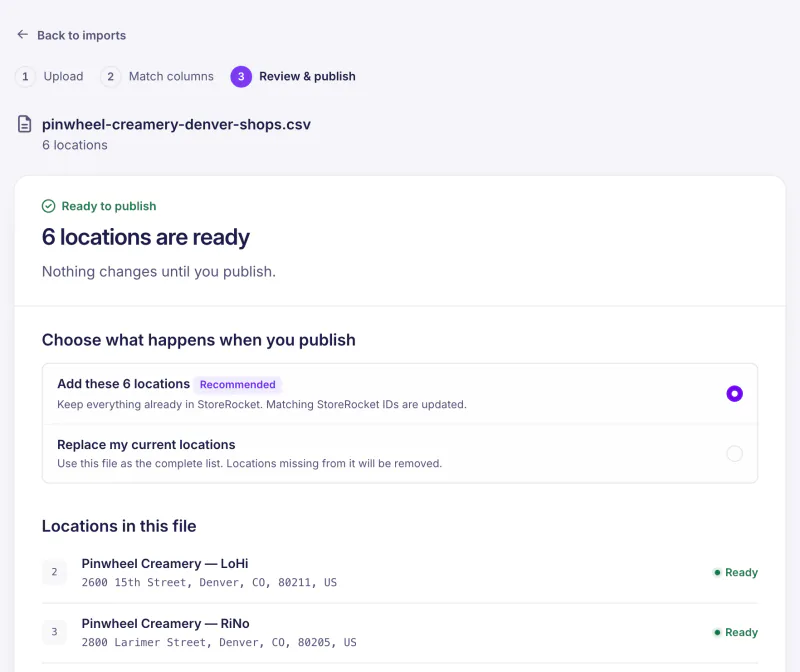
- Import your existing spreadsheet as a CSV or Excel file
- Open Google Sheets Sync in StoreRocket and create a new linked spreadsheet
- StoreRocket exports your locations and emails you the spreadsheet link
- Edit that linked spreadsheet using its template columns
- Enable automatic daily sync, or click Sync from Sheets after editing
Continuous sync uses the spreadsheet created by StoreRocket. Follow the Google Sheets setup guide.
When distributors update your retail data, changes appear after the next sync.
Configure filters:
- Channel types (Liquor, Grocery, Bar, Convenience)
- Product lines and SKUs
- Pack sizes and formats
- On-premise vs. off-premise
Step 4: Design and Brand
- Select a theme matching your brand
- Set your colors (accent, buttons, text)
- Upload custom markers
- Set the default search radius, smaller for everyday products than for specialty ones
Step 5: Enable Analytics and Lead Capture
Analytics setup:
- Turn on analytics (depends on the plan)
- Read the search map for where people searched, not just where your stores are
- Watch the searches that came back with nothing nearby, and the click total per location
Lead capture (depends on the plan):
- Turn on the form that appears when a search finds no store nearby, with a heading like "Notify me when it's available near me"
- Each submission is listed on the Leads page, and your team gets an email for each new lead
- Your developers can pull leads into your email platform through the REST API (depends on the plan)
Step 6: Deploy
Copy your install code from the Install page in the StoreRocket dashboard and paste it into the page where the locator should appear.
Strategic placement:
- Dedicated /find-us or /where-to-buy page
- Add to main navigation
- Link from product pages: "Find this near you"
- Instagram link-in-bio
- QR codes on packaging linking to locator
Step 7: Monitor and Optimize
Weekly:
- Review search patterns
- Check for searches in areas without retailers
Monthly:
- Analyze distribution gap data
- Share where people searched with distributor partners
- Review lead capture performance
Quarterly:
- Strategic distribution review
- New market opportunities from search data
- Update retail data comprehensively
Beverage Store Locator Best Practices
Add QR Codes to Packaging
When someone enjoys your product somewhere else, they need to find it:
- QR code linking to locator
- "Find more at yourbrand.com/findus"
- On packaging, coasters, point-of-sale materials
Separate On-Premise from Off-Premise
Customers have different intents:
- Off-premise: "Where can I BUY this?"
- On-premise: "Where can I DRINK this?"
Clear tabs or filters prevent confusion.
Use Search Data for Distribution
Your locator reveals distribution opportunities:
- High-search areas with no retailers → pitch distributors
- Seasonal patterns → timing for new market entry
"Buy Online" as Safety Net
When the nearest retailer is too far, capture the sale:
- A "Buy online" button linking to an online retailer or your own site
- "Ship to me instead" option
- Prevents losing the customer entirely
Keep Data Fresh
Beverage retail changes constantly:
- Stores open, close, change inventory
- Work with distributors for regular updates
- Verify data quarterly at minimum
- Remove retailers who no longer carry your product
Track "Out of Stock" Feedback
Give customers a way to report issues:
- A "Report a problem" button on each location that opens your own feedback form
- "Product not found at this store" reports reach your team
- Helps identify distribution problems
Common Beverage Store Locator Mistakes
Mistake 1: Stale Retailer Data
Showing stores that don't carry your product frustrates customers and damages retailer relationships. Keep data fresh.
Mistake 2: Ignoring On-Premise
If your product is sold in bars and restaurants, include them. Many customers want to try before they buy retail.
Mistake 3: No Product Filters
If you have multiple SKUs, customers need to find the specific product they want. Don't show stores that only carry a different variant.
Mistake 4: Missing Online Fallback
Not everyone lives near a retailer. Offering "buy online" prevents losing the sale entirely.
Mistake 5: No Distribution Intelligence
Your locator generates valuable data. If you're not analyzing where people search vs. where you distribute, you're leaving growth on the table.
Mistake 6: Ignoring Legal Restrictions
Alcohol has purchase time restrictions. Showing hours, and purchase cutoffs in a custom field, prevents frustrated customers.
Get started with your beverage store locator
StoreRocket gives beverage brands a store locator for their own website: import your retailers from a spreadsheet, match it to your brand and paste one embed code. Create your locator with a free trial, no credit card needed.
Frequently Asked Questions
What does a store locator cost to run for a beverage brand?
It depends on the plan, which is sized by the number of locations: see pricing. You can start with a free trial, no credit card needed. During the trial StoreRocket supplies the map. After you subscribe you connect your own Google Maps or Mapbox key and pay that provider directly for map usage. Product filters are on every plan; analytics and lead capture depend on the plan.
Where does retail location data come from?
Typically from your distributor partners, who track which retailers carry your products. Some brands also use third-party data verification services, sales team check-ins, or public retailer information. The key is keeping it updated.
Can I show different products at different retailers?
Yes. With StoreRocket, you create a filter for each product and tag the retailers that carry it. Customers can then filter for the stores that carry your new flavor or limited release.
How do I handle alcohol purchase restrictions?
Show weekly store hours, and put any purchase cutoff times (for example "Beer/Wine until 10pm") in a custom field. For age-gated products, put the locator page behind your site's age gate.
Can I send customers to buy online?
Yes. StoreRocket supports custom call-to-action buttons. You can show a "Buy online" button on each retailer, linking to your own e-commerce or any online retailer.
How do I get distributor data into my locator?
Most brands maintain a spreadsheet updated from distributor reports. With Google Sheets sync (depends on the plan), you update the spreadsheet and your locator reflects changes after the daily sync, or on demand. Some brands automate this from distributor portals.
Questions about your beverage locator? Message us.
People are looking for your drinks right now
Import your locations from a spreadsheet, match the locator to your website, and add it where you would add a video.
7 days free · No card · No automatic charge · see a live locator first