Build your pickup point locator
Import a spreadsheet, match your website, and add it like a video. No credit card required.
A pickup point locator has one job: show a customer the nearest place to collect or drop off a parcel that is open and suits their parcel. A few drop-off points that rarely change can live on a simple map. A network of lockers, parcel shops and depots with different hours and attributes needs a marker and filter per point type, an open-or-closed status and a way to keep points current from a spreadsheet or your own system, and that is what StoreRocket is built for. Plans are sized by location count, so check your network size against pricing.
StoreRocket makes only store locators, and we have been building them since 2018. StoreRocket hosts the locator and delivers updates through the embed already on your site, so your team keeps points current in the dashboard, a spreadsheet or the REST API (depends on the plan). You can create your locator and load your own list of points during the free trial. We make StoreRocket, so weigh our view with that in mind.
Related: All use cases | Click and collect guide | What is curbside pickup? | BOPIS guide
The short answer
A simple map is enough when
- You have a handful of drop-off points that rarely open, close or change.
- Customers only need to see where a point is, not whether it is a locker or a shop.
- Nobody needs a filter by type, weekend opening or returns.
- A developer is happy to edit the page whenever a point changes.
Use StoreRocket when
- Your network mixes lockers, parcel shops, depots and returns points, each with its own marker and attributes.
- Customers filter by what matters to them: lockers only, open on weekends, accepts returns.
- Points open, close and change status often, and you update them from a spreadsheet or your own system through the REST API (depends on the plan).
- You serve several markets and want the locator’s built-in text in each customer’s language (depends on the plan).
Only a few locations and no budget? You may not need a store locator at all. A free embedded map with a pin for each location is fine when the list is short, rarely changes and visitors only need to see where you are. Our guide to free store locator options compares them.
Why carriers need a pickup point locator
Out-of-home delivery depends on customers finding a point
Parcel lockers and pickup points (collectively "out-of-home" or OOH delivery) let a parcel wait at a place the customer chooses instead of at their door. The locator is where that choice is made, so it has to make a convenient point easy to find.
The map does three jobs
A pickup point map serves customers at several moments:
- Before checkout: customers look for a convenient collection point near home or work
- On the carrier's marketing site: "find a pickup point" is a page people search for
- After purchase: "where do I collect my parcel?" is a common support question, and a clear locator answers it
An accurate, current locator saves customers a trip to a closed or full point, and saves your team the support ticket.
Types of pickup and drop-off points
A real network is a mix of point types, each with different hours, capabilities, and customer expectations:
| Point type | What it is | Key attributes to show |
|---|---|---|
| Parcel locker (APM) | Automated, self-service lockers, often 24/7 | Availability/free slots, locker sizes, 24/7 status |
| Parcel shop | Staffed pickup point inside a retail store | Opening hours, accepts returns, payment methods |
| Carrier depot | The carrier's own branch/hub | Hours, full service, larger parcels |
| Click & collect | A retailer's own in-store counter | Hours, order-ahead, collection times |
| Returns drop-off | Drop-off-only point for returns | Carriers accepted, label-free returns |
Customers care about the differences. Your locator has to make them obvious at a glance: different markers per type, an open or closed label on points that have hours, and filters to narrow to "lockers only" or "open 24/7."
Features That Matter for a Pickup Point Locator
Availability and capacity
A locker that is full is no use to the customer, so show availability where your systems know it. A simple "available / full" state, or free-slot capacity, helps a customer pick a point they can use. Capacity comes from your own systems: you keep a custom field current through the REST API (depends on the plan, see pricing). It shows in each point's details and is as current as your last update, not a live reading.
Locker-vs-shop filtering
Let customers narrow the list: lockers only, staffed shops, open on weekends, open 24/7, accepts returns, accepts cash. Filters are the difference between "47 points near you" and "the one point that fits what I need."
Opening hours and "open now" status
A 24/7 locker and a shop that closes at 6 are not the same. Show opening hours and an at-a-glance open/closed label so customers don't drive to a closed point.
Distance, search, and directions
Search by address, postcode or current location, results sorted by nearest, and directions that open in Google Maps.
Multi-country and multi-language
Carrier networks rarely stop at one border. The locator has to place addresses from each market you serve and show its labels in the local language. Multi-language (depends on the plan) switches the locator’s built-in text among a catalogue of languages. The points’ own names and details stay as you enter them.
Network scale
Thousands of points on one map need clustering. Nearby points can group into a cluster that shows their count, so a country overview stays readable.
Built for multi-market networks
Pickup point networks are geographic and often multi-market. A locator for this use case has to:
- Cluster: show a country overview as counts, then individual points as the customer zooms
- Place addresses: imports place each address on the map for you, and rows that already have latitude and longitude keep them
- Localize the locator: its buttons, labels and messages in the customer's language (depends on the plan)
- Stay in sync: points open, close and change capacity often, so the data has to keep up via the REST API, CSV import or Google Sheets sync (plan-dependent)
How to build a pickup point locator with StoreRocket
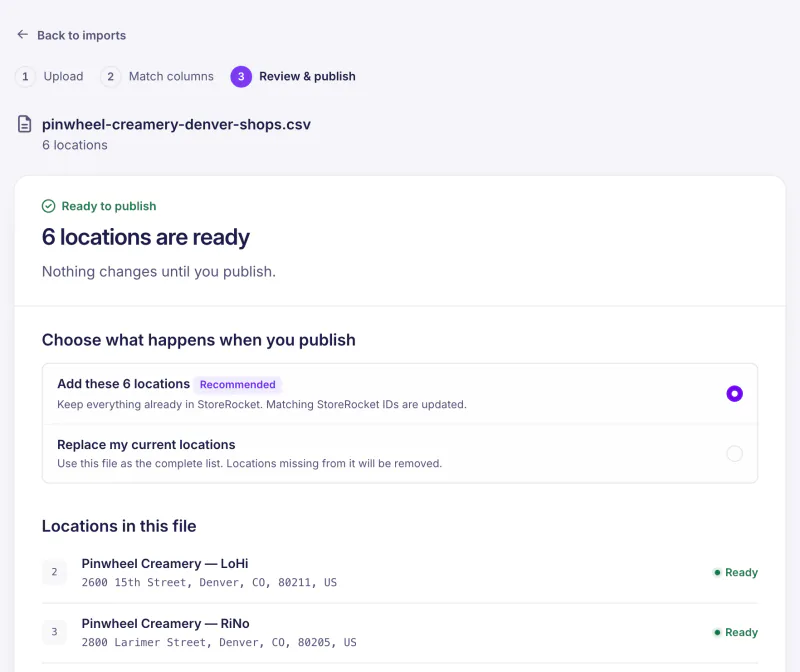
- Load your network: import points via CSV or Excel. For Google Sheets sync (depends on the plan), create a linked spreadsheet in StoreRocket and edit that sheet using its template columns. The Google Sheets setup guide explains automatic daily sync and manual syncing. Carriers with their own systems can update points programmatically through the REST API (depends on the plan).
- Tag each point by type with a filter (locker, parcel shop, depot, click & collect, returns), and give the points of each type their own map marker so they're easy to tell apart.
- Add the attributes customers filter on: accepted carriers, payment methods, returns support, weekend and 24/7 opening as filters, since filters are what the search narrows on; capacity as a custom field, which shows in the point's details; opening hours in each point's hours, which give it an Open now / Closed label.
- Turn on filters and search: locker-vs-shop, weekends, 24/7, returns, plus address/geolocation search and directions.
- Keep availability current: push capacity and status through the REST API (depends on the plan) whenever they change, so the map shows your network as of your last update.
- Embed it: copy the embed code from the Install page and paste it into your marketing site and your help center, wherever a page accepts an embed or HTML block.
Implementation Checklist
- Data: every point placed on the map, typed (locker/shop/depot/etc.), with hours and attributes
- Sync: the REST API, the daily Google Sheets sync or a fresh import keeping the network current, including hours and availability (plan-dependent)
- Markers: a distinct marker per point type
- Filters: type, weekends, 24/7, returns, payment
- Hours: opening hours and a timezone on every point, for the Open now / Closed label
- Search: address, postcode, geolocation, sort-by-nearest, directions
- Localization: languages (depends on the plan) and addresses for each market you serve
- Embeds: marketing site and support center
Who It's For
- Parcel carriers and couriers running locker and pickup-shop networks
- Last-mile and OOH delivery networks aggregating points across carriers
- Marketplaces and retailers offering pickup and click & collect at checkout
- Returns platforms that need a drop-off finder
If your business depends on customers finding the right collection point, the locator is part of your service.
Frequently Asked Questions
What does a store locator cost to run for a pickup point network?
It depends on the plan, which is sized by the number of locations: see pricing. You can start with a free trial, no credit card needed. During the trial StoreRocket supplies the map. After you subscribe you connect your own Google Maps or Mapbox key and pay that provider directly for map usage.
What is a pickup point locator?
A pickup point locator is an interactive map and search tool that helps customers find the nearest place to collect or drop off a parcel (parcel lockers, staffed pickup shops, carrier depots or click-and-collect counters), filtered by what they need and sorted by distance.
Can it show parcel lockers and staffed shops on the same map?
Yes. You tag each point with its type (locker, parcel shop, depot, returns, click & collect) as a filter and give it that type's map marker, and customers can filter to just the type they want.
Can the locator show whether a locker is full or available?
Capacity comes from your own systems. You can show an availability or capacity state in each point's details with a custom field, and keep it current through the REST API (depends on the plan), so the map shows what your network last reported.
Does it handle large, multi-country networks?
StoreRocket groups nearby points into clusters, places the addresses you import, and can show the locator’s built-in text in several languages (depends on the plan). Plans are sized by location count: see pricing.
How do customers find their nearest point?
They search by address, postcode, or current location. Results sort by distance, and a single tap opens directions in Google Maps.
Can customers see which points are open now?
Yes. Each point with weekly hours shows an Open Now or Closed status, worked out in that point's own time zone. Open Now is a status on the result, not a filter. Points that open on weekends or 24/7 can be tagged with a filter, so customers can narrow to them.
How do I keep the network up to date?
Update your points through the REST API or Google Sheets sync (both depend on the plan), or import a CSV file. Carriers with their own systems can use the REST API so points, hours and availability follow their operational data.
Where can I embed the locator?
On any page that accepts an embed or HTML block, such as your marketing site and your help center, using one embed code.
Can each point type have a different marker?
Yes. Assign a distinct marker per point type so lockers, parcel shops, depots, and drop-off points are easy to tell apart on the map.
Does it support multiple languages?
Yes, on a plan that includes it. The locator's built-in text (buttons, labels and messages) can be shown in the customer's language. Location content such as point names is not translated.
How does it show thousands of points?
Nearby points can group into a cluster that shows their count, and the map shows individual points as the customer zooms in.
Customers are looking for a pickup point right now
Import your locations from a spreadsheet, match the locator to your website, and add it where you would add a video.
7 days free · No card · No automatic charge · see a live locator first